

Introduction
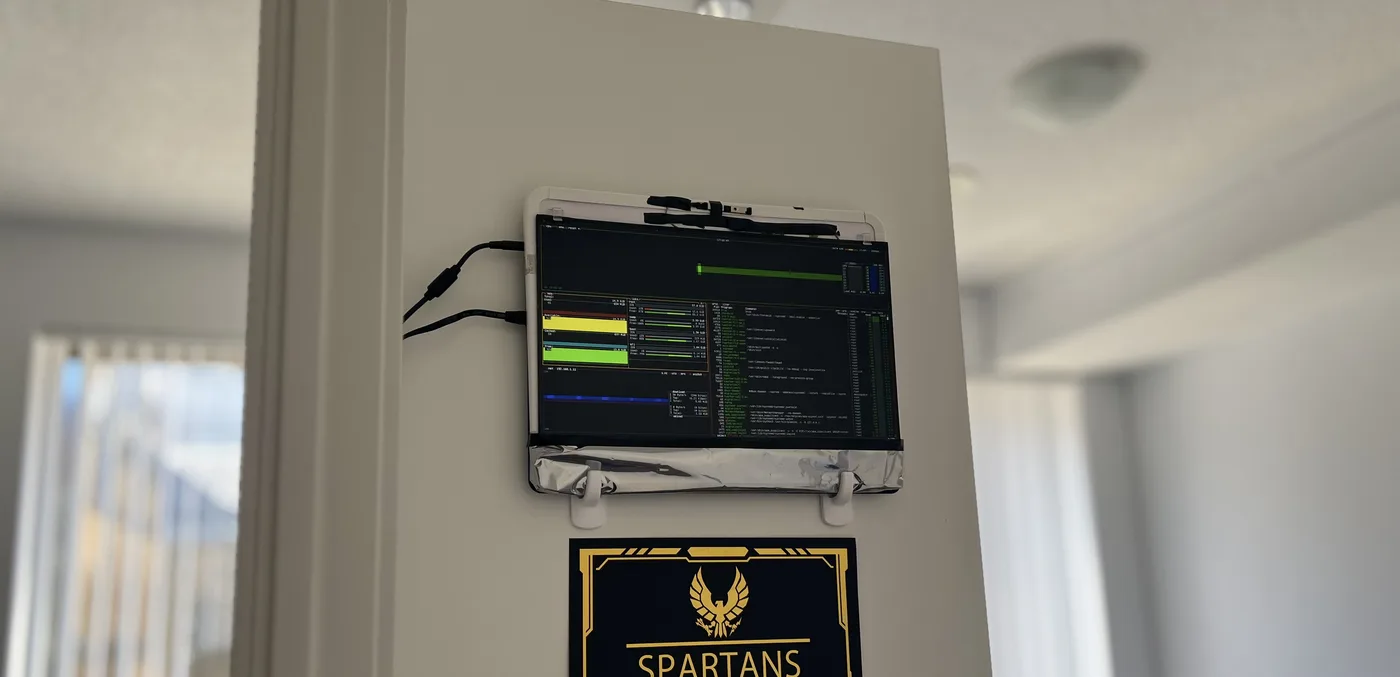
Welcome to my HomeLab Page. I built this lab to learn how to manage servers, so that I could eventually build a better lab to manage the servers I bought to learn how to manage servers.
Like all things in life, one does not magically rise to the top of a skill ladder without first stepping on the first rung. There is a whole world of software that is only useful on machines that run 24 hours a day, 7 days a week, 52 weeks a year. Therefore, the only way to learn those softwares is to have my own machine that runs 24/7.
This server is my production playground. Here I deploy services, automate workflows, experiment with new technologies, and manage real infrastructure. It’s where I learn how systems behave in the real world — the same principles used in enterprise environments.
Below is a collection of the services I run, monitor, and maintain on this system.
Hardware & Network Infrastructure
The server runs on a repurposed Dell Inspiron 5584 with an Intel i7-8565U, 16GB RAM, and a 240GB SSD. I chose to reuse existing hardware to build a cost-efficient, always-on system with enough capacity to run multiple services and infrastructure workloads.
While this isn’t enterprise hardware, it provides more than enough headroom to simulate real production environments at a small scale — allowing me to deploy, monitor, and manage services under realistic constraints.
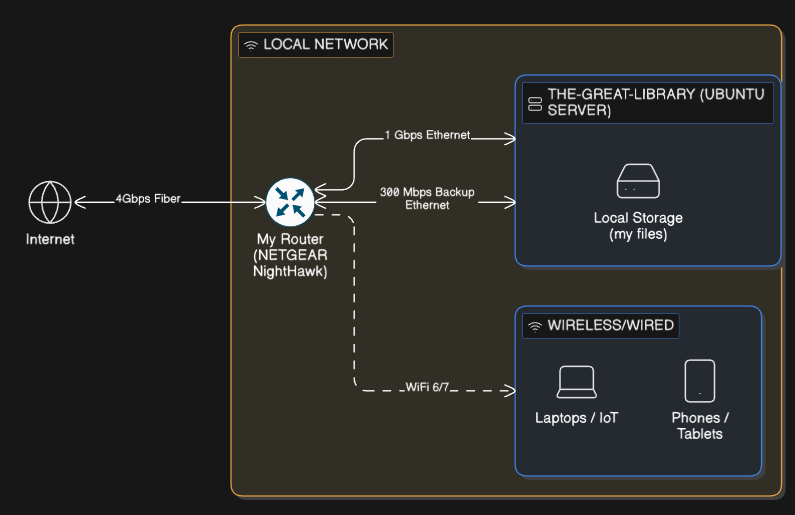
For network reliability, the system is connected through two Ethernet links — a primary gigabit connection and a secondary 300Mbps backup — so services stay available if the main connection goes down.
My network is built around a Nighthawk multi-gig router, giving the homelab enough capacity to handle remote access, web traffic, media streaming, and internal services without hickups.
Core Services & Infrastructure
Ubuntu Server
I run Ubuntu Server instead of a desktop operating system to minimize resource usage and power consumption. A lightweight, headless Linux environment reduces system overhead, allowing more services to run efficiently while keeping electricity usage low during idle periods.
The server is managed entirely over SSH from other machines, eliminating the need for a graphical interface and keeping the setup simple, stable, and optimized for long-term, 24/7 operation.
Docker & Containerization
Docker serves as my containerization platform, allowing me to run isolated services with ease. I store Docker Compose files on the Samba network drive (see later in this article) for version control and easy management.
WireGuard VPN with DuckDNS
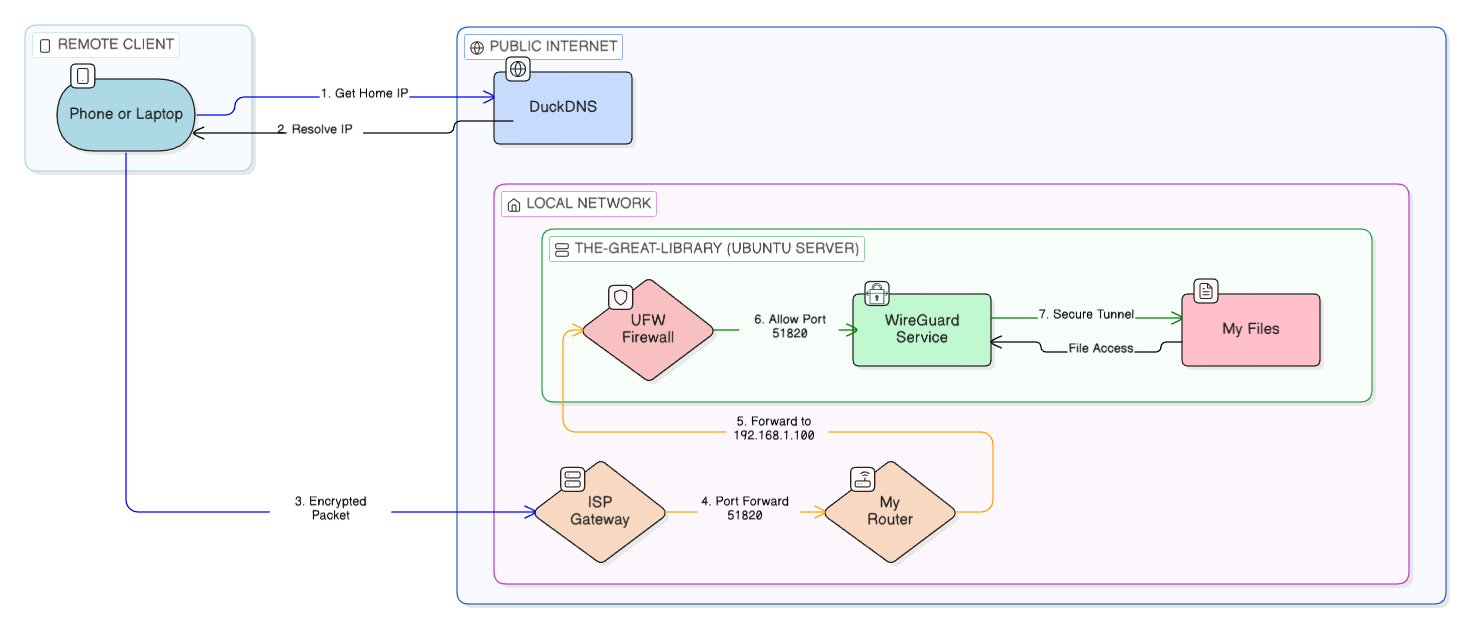
A machine with an uptime of months is bound to break down every now and then. So I set up a WireGuard VPN with DuckDNS so I can securely connect to my server from anywhere. This lets me manage the server, access my files, and use internal services as if I were on the local network.
Access is restricted through firewall rules and VPN authentication, ensuring that internal services remain private and are never exposed directly to the public internet. This setup provides fast, reliable, and secure remote control while maintaining a strong security posture.
Samba Network Drive
I use Samba to create a shared storage system that my personal Windows machines can access like a network drive. It acts as a central place for my media, Docker configurations, website builds, project files, and other important data. Having everything in one location makes it easy to work across devices and keeps my environment organized.
Web Hosting & Security Architecture
Cloudflare Zero Trust Tunnel & Nginx
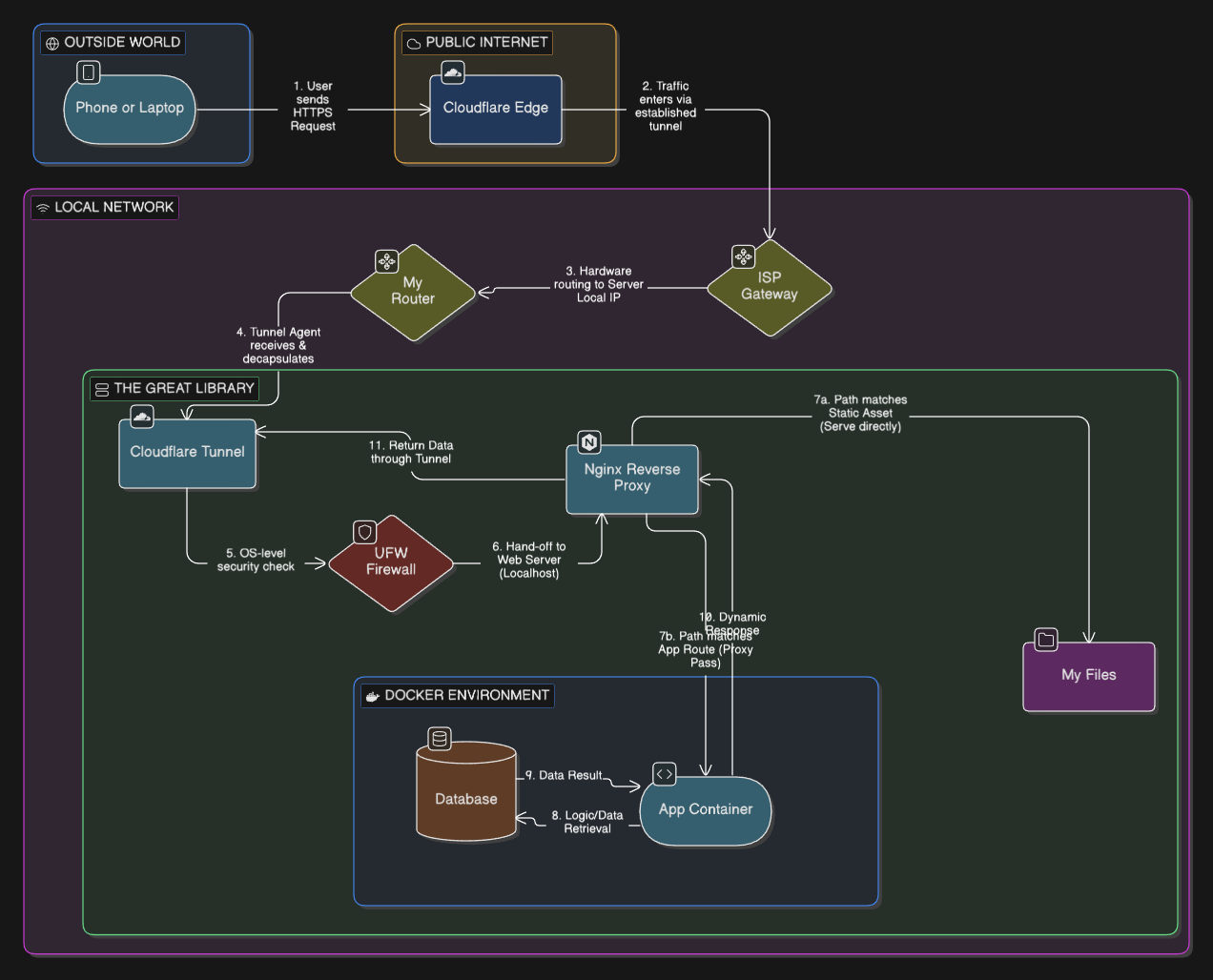
For web hosting, I use a Cloudflared Tunnel together with an Nginx reverse proxy to publish services without opening ports on my router. This lets me run websites from home while keeping the network private and reducing the attack surface.
- The server’s real IP stays hidden behind Cloudflare
- Traffic is filtered and protected by Cloudflare’s network
- No direct inbound ports exposed on the home network
- SSL/TLS is handled automatically
- Requests are routed internally through Nginx to the right services
- Taking advantage of Cloudflare cache, which limits the requests incoming to my server. This helps save on hardware resources.
This setup lets me host multiple applications securely while keeping control of the infrastructure. It’s the same architecture many enterprises use at a production level. I have learned how to minimize exposure, layer security, and keep services isolated behind a controlled entry point using this configuration.
Minecraft Server
"The only thing faster than the speed of light is how quickly a 'Testing Environment' becomes a 'Survival Minecraft' server."
— u/KernelPanicAtTheDisco (1.2k upvotes)
I run a Minecraft server in a Docker container with a port opened so friends can connect directly without needing a VPN. This is one of the only service with a port intentionally exposed, and I’ve limited access to only the required port using UFW firewall rules. It’s a deliberate trade-off between security and usability, with the rest of the system kept isolated and protected.
Firewall & Security Measures
Uncomplicated Firewall (UFW)
I use UFW to control which ports and services are allowed to communicate with the server. By default, everything is blocked and only the ports that are absolutely necessary are opened. This keeps the exposed surface minimal and helps prevent unwanted access to the system.
The goal is to contain risk — even if one service has an issue, it can’t easily reach other parts of my network or access anything it shouldn’t. I try to treat the setup with the same security mindset I would use in a production environment.
Media & Monitoring Services
Plex Media Server
I run Plex as a self-hosted media service to manage and stream content stored on my network share. It handles indexing, metadata management, and efficient streaming to devices both locally and remotely.
Glances Monitoring
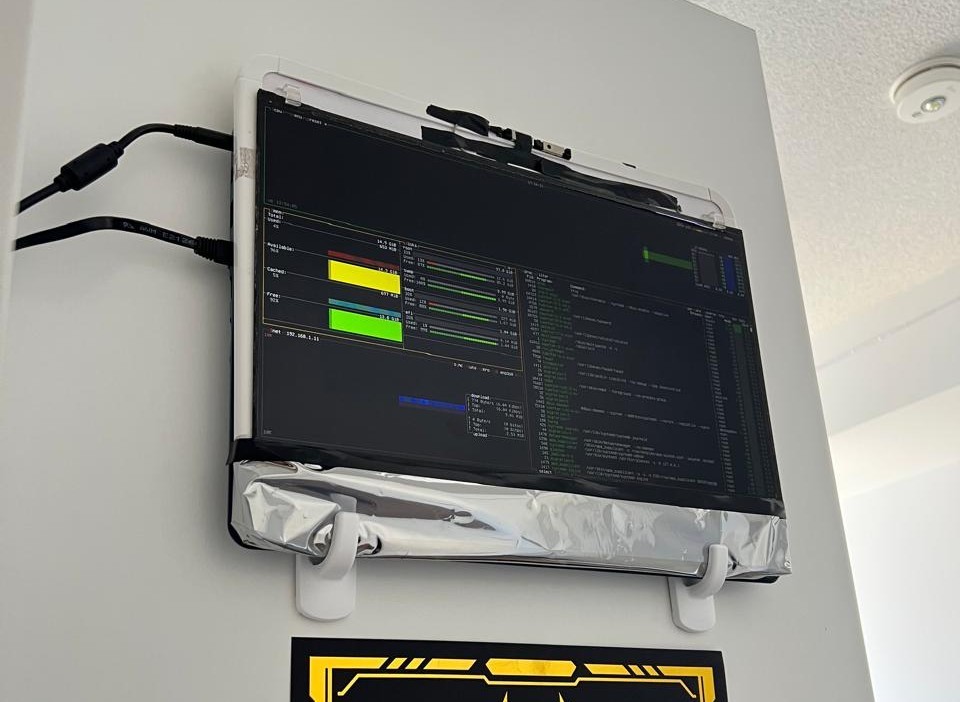
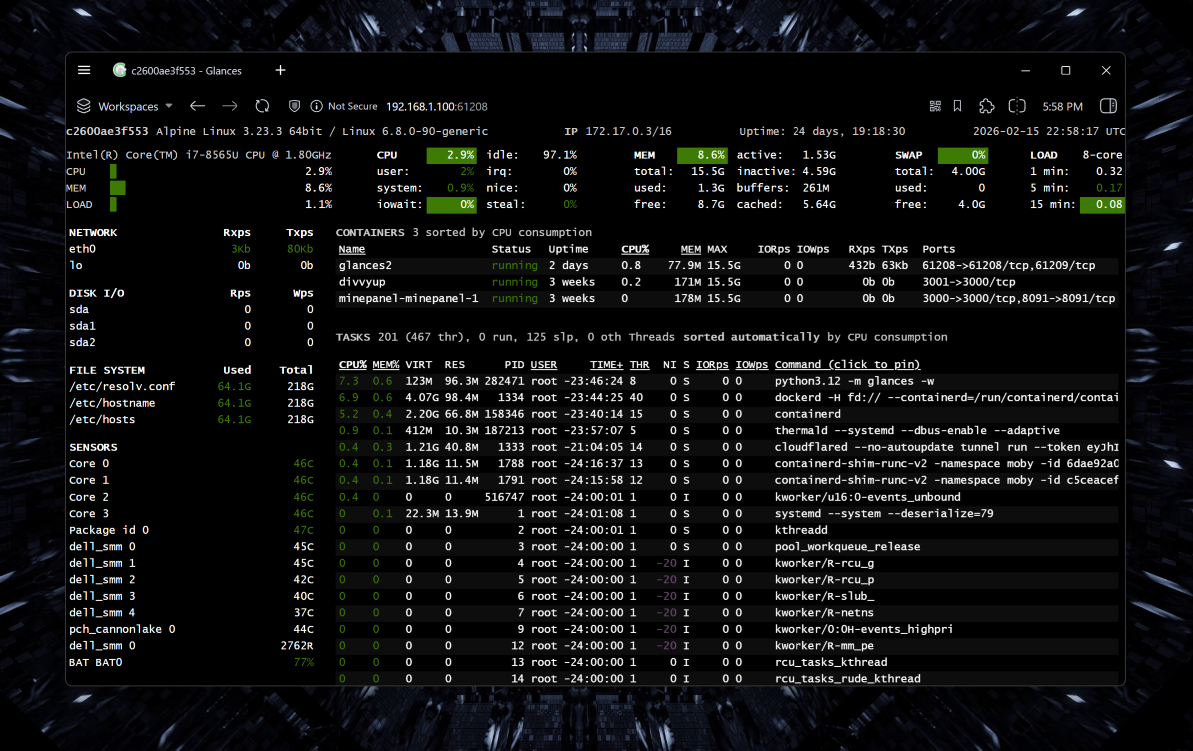
I use Glances for real-time system monitoring through a web interface on the local network. It tracks key metrics like CPU, memory, disk activity, network usage, running processes, and even docker containers. It comes with an integrated REST API which I fetch with my own ASP.NET Core backend to collect live system statistics displayed on shaafyousaf.com/homelab.
Additional Local Services
In addition to the core services, I host several internal websites and tools for development, testing, and personal projects. These environments let me experiment safely, test deployments, and run applications before exposing anything publicly. Having dedicated internal services also helps streamline my workflow and keeps my development and infrastructure work organized.
Conclusion
This setup reflects how I like to learn: by building, testing, and improving continuously. It’s an ongoing project that grows with my skills and curiosity.
Reach out to me for more information/collaboration. I'd love to talk.